Foxidea

Cerchi casa su Idealista e Immobiliare.it? Foxidea si ricorda cosa hai già visto.

House hunting on Idealista and Immobiliare.it? Foxidea remembers what you've already seen.

Un'estensione per Firefox che segna gli annunci già aperti o scartati, riconosce lo stesso immobile sui due portali, ti dice da quanto un annuncio è online e ti avvisa se la descrizione parla di muffa, infiltrazioni e altri problemi.

A Firefox extension that marks the listings you've opened or dismissed, spots the same home on both portals, shows how long a listing has been online and warns you when the description mentions mould, leaks and other problems.

Installa in Firefox Install in Firefox Versione 0.2.4 · firmata da Mozilla Version 0.2.4 · signed by Mozilla

Cosa vedi mentre navighi

What you see while browsing

Ogni annuncio ha il suo pannello

Every listing gets its own panel

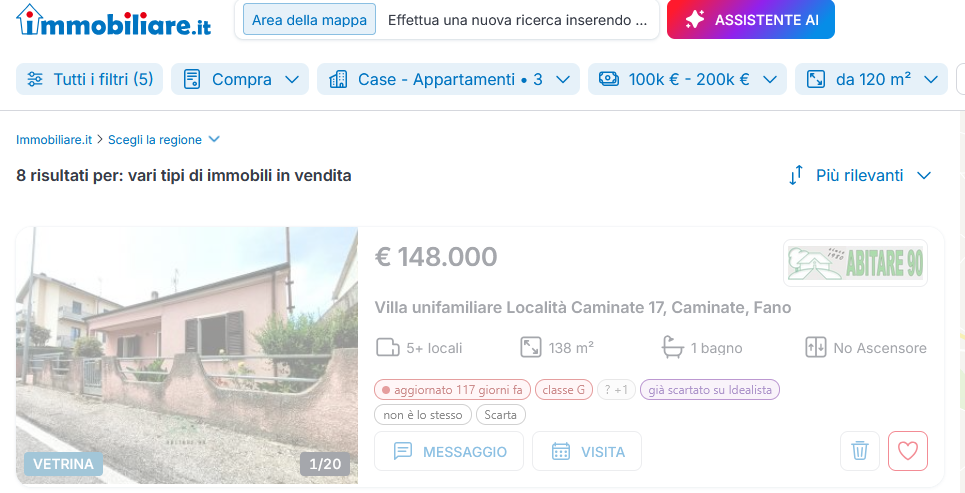
Nella lista dei risultati, sotto ogni scheda compare un pannellino: età dell'annuncio, classe energetica, problemi trovati nella descrizione e i tuoi criteri (box, cantina, terrazzo…) con ✓ o ✗. Basta passarci sopra con il mouse per farlo analizzare.

In the results list, a small panel appears under every card: the listing's age, its energy rating, problems found in the description and your own criteria (garage, cellar, terrace…) marked ✓ or ✗. Hover over a card and it gets analysed.

meno di un mese uno o due mesi più di due mesi under a month one or two months over two months

Su Immobiliare.it età, classe energetica, problemi e parole cercate compaiono quando apri l'annuncio, fermi il mouse sulla scheda o clicchi un prezzo sulla mappa. I criteri presi dai filtri, per ora, valgono solo per Idealista.

On Immobiliare.it, age, energy rating, problems and searched words show up once you open the listing, rest the mouse on its card or click a price on the map. Criteria taken from the filters apply, for now, to Idealista only.
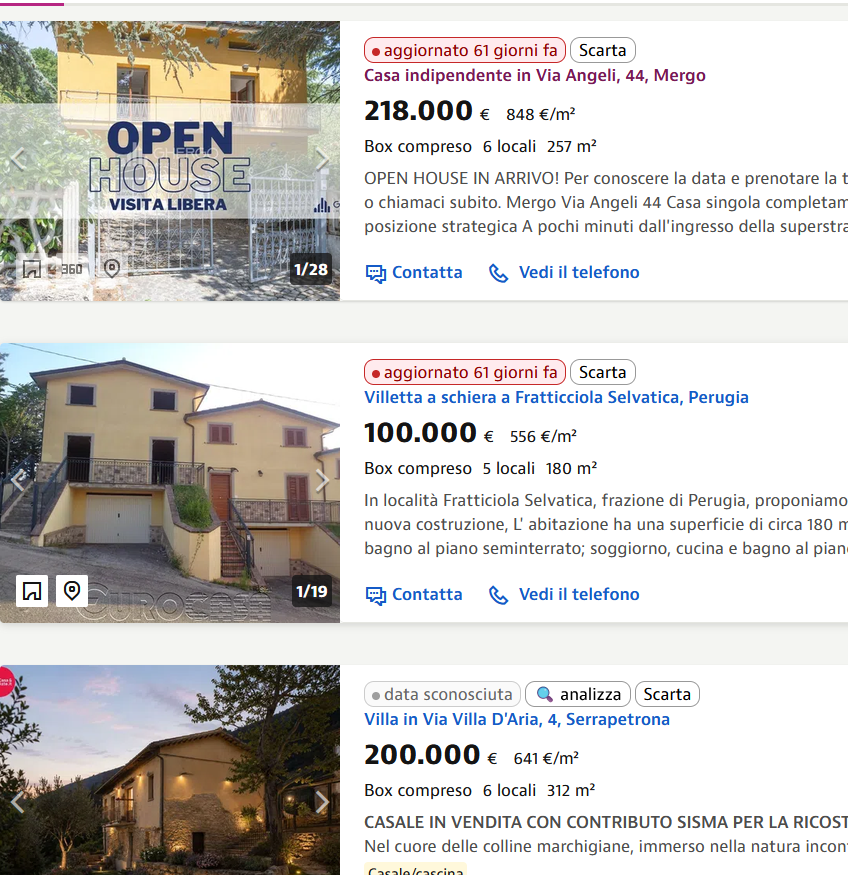
Lista di annunci Idealista con il pannello Foxidea

Classe energetica a colpo d'occhio

Energy rating at a glance

Quando Foxidea legge l'annuncio, accanto all'età compare la classe energetica dichiarata: verde per A e B, gialla per C e D, rossa da E a G. Niente più aprire ogni annuncio per scoprire che è in classe G.

Once Foxidea has read the listing, the declared energy rating appears next to its age: green for A and B, yellow for C and D, red from E to G. No more opening every listing only to find it's rated G.

A · B C · D E · F · G

Le tue parole, cercate in ogni descrizione

Your own words, searched in every description

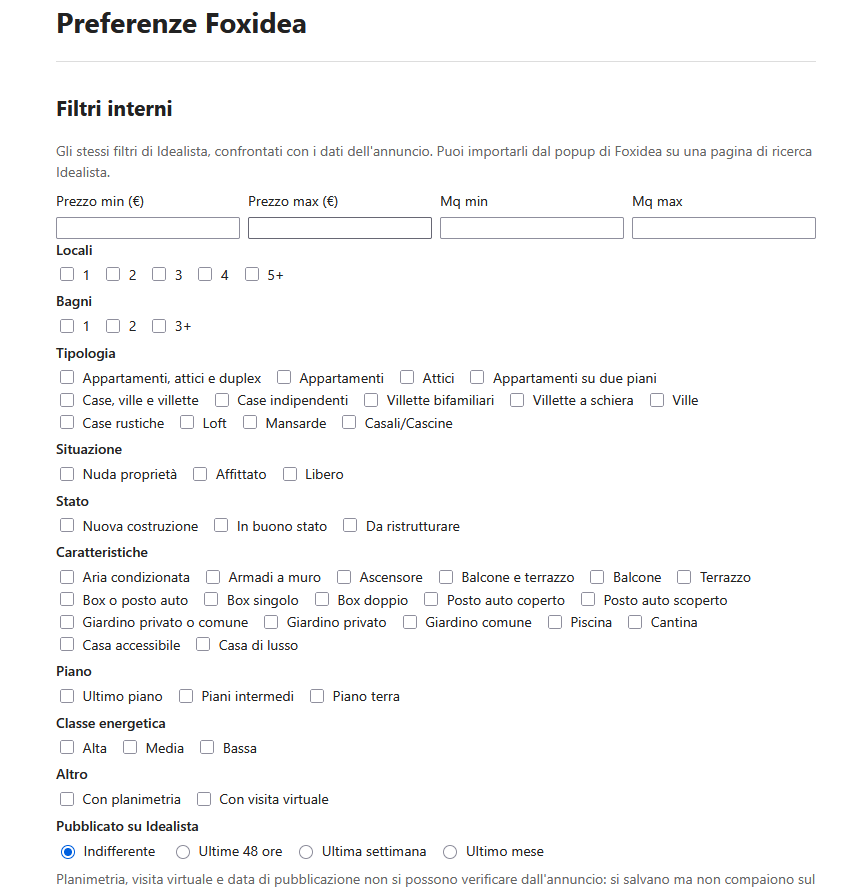
Nelle preferenze scrivi le cose che contano per te e che Idealista non ha tra i filtri: "sgabuzzino", "doppia esposizione", "taverna"… Foxidea le cerca nella descrizione e le mostra in verde se ci sono. Capisce anche le negazioni: "senza taverna" non vale come trovata. Quelle non menzionate finiscono in un chip riassuntivo, con l'elenco passandoci sopra.

In the preferences you write down what matters to you and Idealista has no filter for: "storage room", "dual aspect", "cellar"… Foxidea looks for them in the description and shows them in green when they're there. It understands negations too: "no cellar" doesn't count as a match. Words that aren't mentioned are grouped in a summary chip, listed when you hover over it.

Le parole vanno scritte in italiano, come nelle descrizioni degli annunci.

Write the words in Italian, the language the listings are written in.

Visti e scartati, senza ricominciare ogni volta

Seen and dismissed, so you never start over

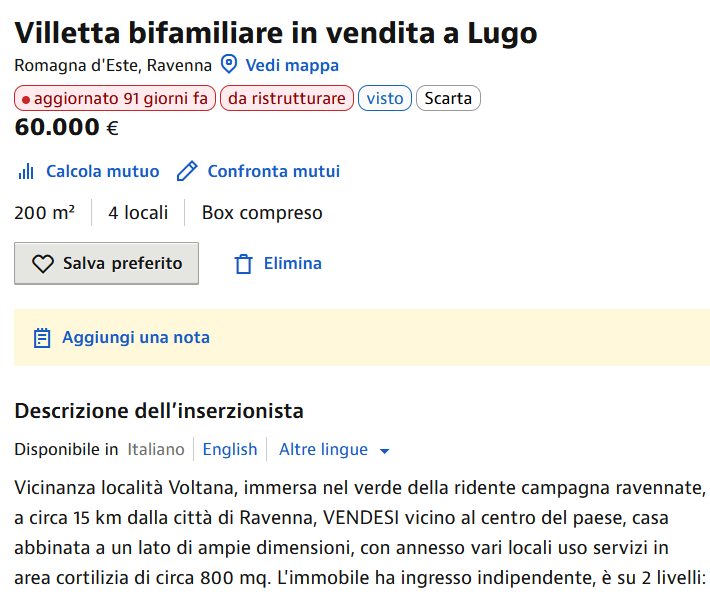
Gli annunci che hai aperto diventano "visti". Con "Scarta" (o con "Elimina" di Idealista e il cestino di Immobiliare.it) la scheda si sbiadisce e non ti distrae più. "Ripristina" la riporta com'era.

Listings you've opened become "seen". "Dismiss" (or Idealista's own "Delete" and Immobiliare.it's bin) fades the card so it stops getting in the way. "Restore" brings it back.

Pagina di un annuncio con il pannello Foxidea sotto il titolo

Lo stesso immobile su due portali

The same home on two portals

Molte agenzie pubblicano lo stesso immobile sia su Idealista sia su Immobiliare.it. Se l'hai già visto o scartato su uno, sull'altro Foxidea sbiadisce la scheda e scrive "già visto su Idealista", con il link all'altro annuncio. Non importa da quale portale hai cominciato.

Many agencies publish the same home on both Idealista and Immobiliare.it. If you've already seen or dismissed it on one, Foxidea fades the card on the other and says "già visto su Idealista" (already seen on Idealista), with a link to the other listing. It doesn't matter which portal you started from.

Foxidea lo riconosce dal codice dell'agenzia, dal testo e dalle foto: è una stima, quindi l'annuncio non viene mai nascosto. Se sbaglia, "non è lo stesso" lo corregge.

Foxidea recognises it from the agency's reference code, the text and the photos: it's an estimate, so a listing is never hidden. If it gets one wrong, "non è lo stesso" (not the same) fixes it.

Scheda di Immobiliare.it sbiadita con l'etichetta già visto su Idealista

Anche sulla mappa

On the map too

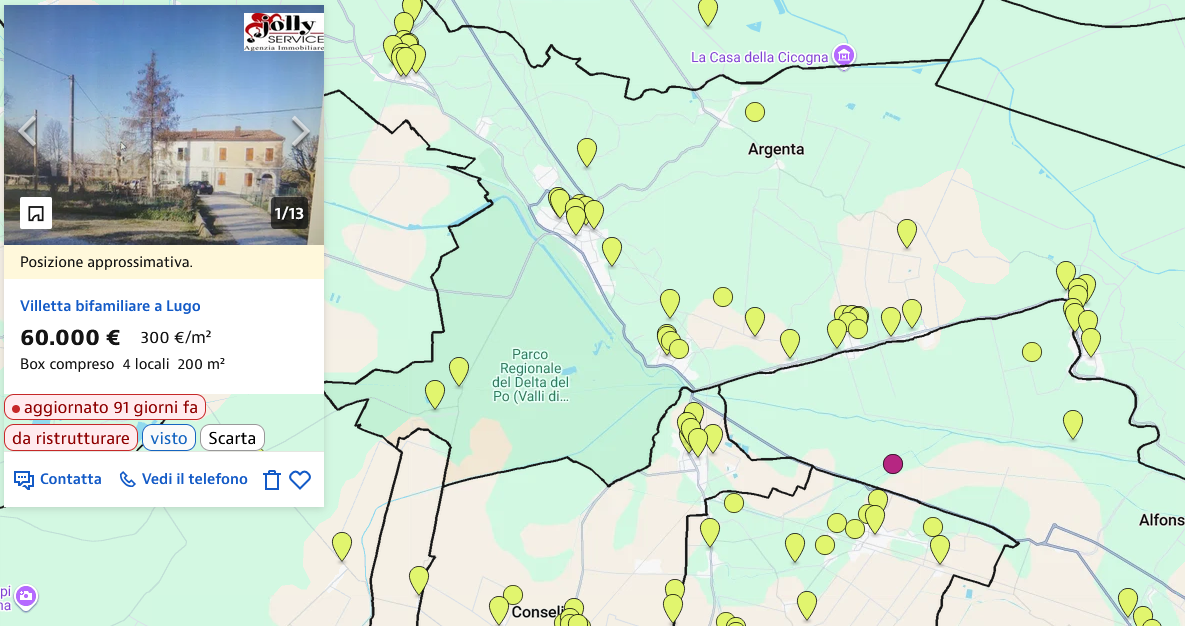
Nella ricerca su mappa, cliccando un segnaposto il pannello compare nell'anteprima dell'annuncio. Su entrambi i portali gli annunci già visti hanno il segnaposto "visitato" del sito, anche sugli altri tuoi browser: icona scura su Idealista, prezzo grigio su Immobiliare.it.

In the map search, click a pin and the panel shows up in the listing preview. On both portals, listings you've already seen get the site's own "visited" pin, on your other browsers too: a dark icon on Idealista, a grey price on Immobiliare.it.

Ricerca su mappa con il pannello Foxidea

Le tue ricerche, i tuoi criteri

Your searches, your criteria

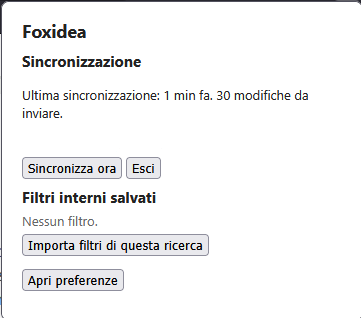
Dal pulsante di Foxidea nella barra importi i filtri della ricerca Idealista che hai aperta. Nelle preferenze aggiungi i criteri che Idealista non ha, le parole da cercare nelle descrizioni e le soglie dei colori.

From the Foxidea toolbar button you import the filters of the Idealista search you have open. In the preferences you add criteria Idealista doesn't offer, the words to look for in descriptions and the colour thresholds.

Preferenze di Foxidea con i filtri salvati

Stesso elenco su tutti i tuoi computer

The same list on all your computers

Con un account, visti, scartati, doppioni riconosciuti e preferenze si sincronizzano tra i Firefox che usi, per entrambi i portali. Senza account Foxidea funziona lo stesso, solo su quel browser.

With an account, seen, dismissed and duplicate listings and your preferences sync across the Firefox browsers you use, for both portals. Without one Foxidea still works, just on that browser.

Popup delle preferenze di Foxidea

Come si installa

How to install it

  1. Apri questa pagina con Firefox

    Open this page in Firefox

    Serve Firefox 140 o più recente, su computer. Chrome, Safari e gli altri browser non sono supportati.

    You need Firefox 140 or newer, on a computer. Chrome, Safari and other browsers aren't supported.

  2. Clicca "Installa in Firefox"

    Click "Install in Firefox"

    Firefox avvisa che ha bloccato la richiesta di installazione di questo sito: clicca "Continua con l'installazione", poi "Aggiungi".

    Firefox says it blocked this site from asking to install software: click "Continue to installation", then "Add".

  3. Apri un annuncio su Idealista o Immobiliare.it

    Open a listing on Idealista or Immobiliare.it

    Fai una ricerca su idealista.it o su immobiliare.it: i pannelli di Foxidea compaiono da soli. Se hai un account e vuoi sincronizzare, accedi dal pulsante di Foxidea nella barra.

    Search on idealista.it or immobiliare.it: Foxidea's panels appear on their own. If you have an account and want to sync, sign in from the Foxidea button in the toolbar.